
Many organizations still rely on spreadsheets for budgeting, reporting, forecasting, and day-to-day analysis even when their operational data lives elsewhere. Customer records may sit in a database, application data may be exposed through an API, and managers may depend on spreadsheet models to turn that information into decisions.
The challenge is keeping these systems synchronized without repeatedly copying and pasting data. An automated data pipeline can provide the connection between them, moving information from source systems through defined transformation steps and into analytical models.
A useful pipeline is not simply an automated file transfer. It should address data quality, authentication, scheduling, error handling, changing schemas, and the reliability of the final spreadsheet output.
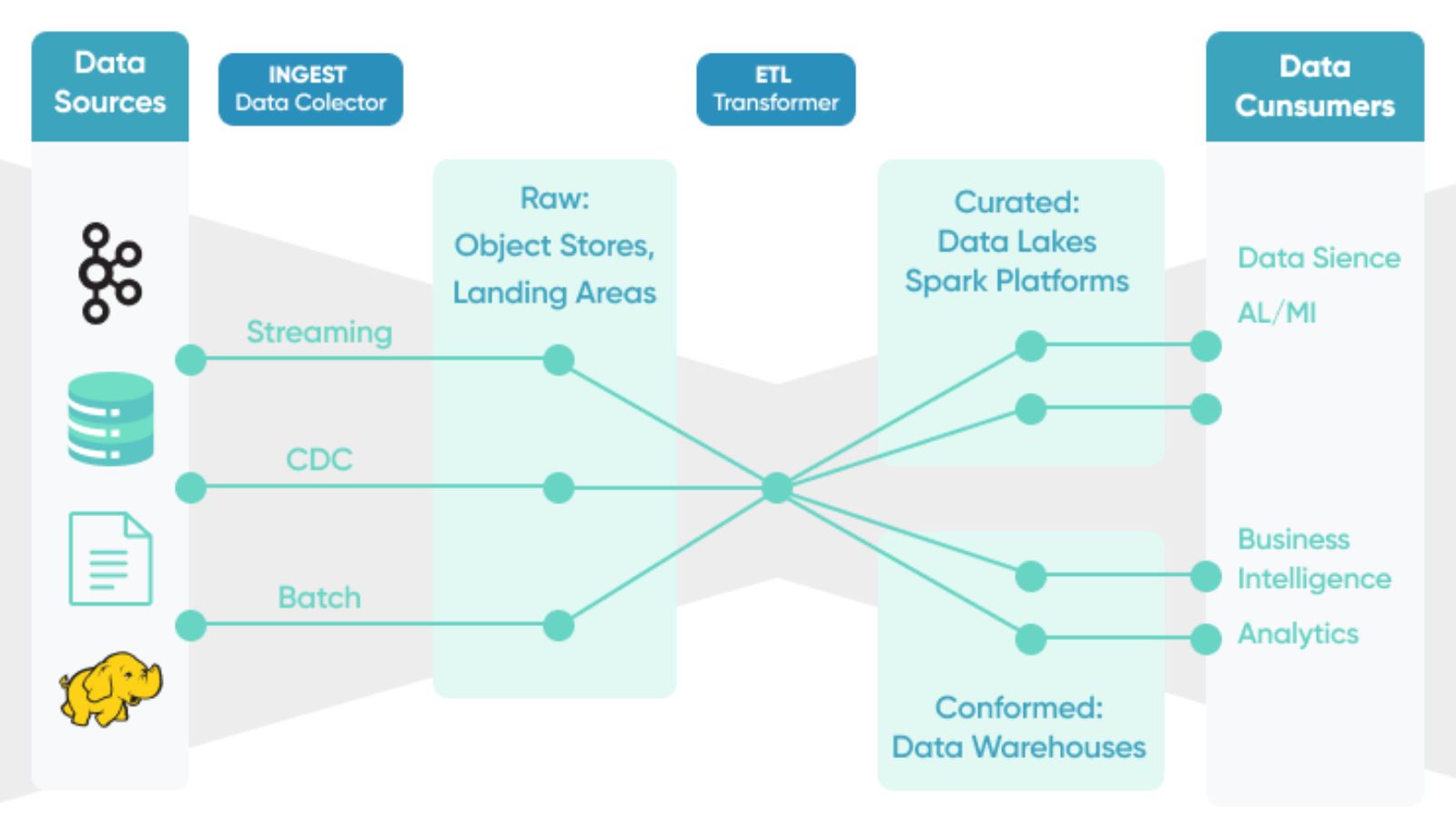
A typical workflow has several stages:
Source → Extraction → Transformation → Validation → Delivery → Analysis
The source might be a relational database, cloud application, CRM platform, or third-party API. Extraction retrieves the required information, while transformation converts it into a structure suitable for analysis.
For example, an API might return customer transactions as JSON records containing nested fields. A spreadsheet model may instead require a simple table with columns for transaction date, customer ID, product, quantity, and revenue.
Separating these stages makes the system easier to troubleshoot. If a spreadsheet suddenly contains no new transactions, you can determine whether the problem occurred during extraction, transformation, validation, or delivery rather than searching through one large automated process.
Database systems are often a better source for recurring analytical pipelines than manually maintained spreadsheets because they can store structured records centrally.
A pipeline might query a database for newly created transactions since the previous successful run rather than downloading the entire dataset every time. This approach can reduce unnecessary processing, particularly as data volumes increase.
The extraction logic should also be explicit about what data it retrieves. Avoid building an analytical pipeline around a query that selects every available field simply because those fields happen to exist. Pull the columns and records required by the downstream model.
For recurring processes, it is also useful to maintain a reliable identifier and timestamp that allow the pipeline to distinguish new or updated records from data it has already processed.
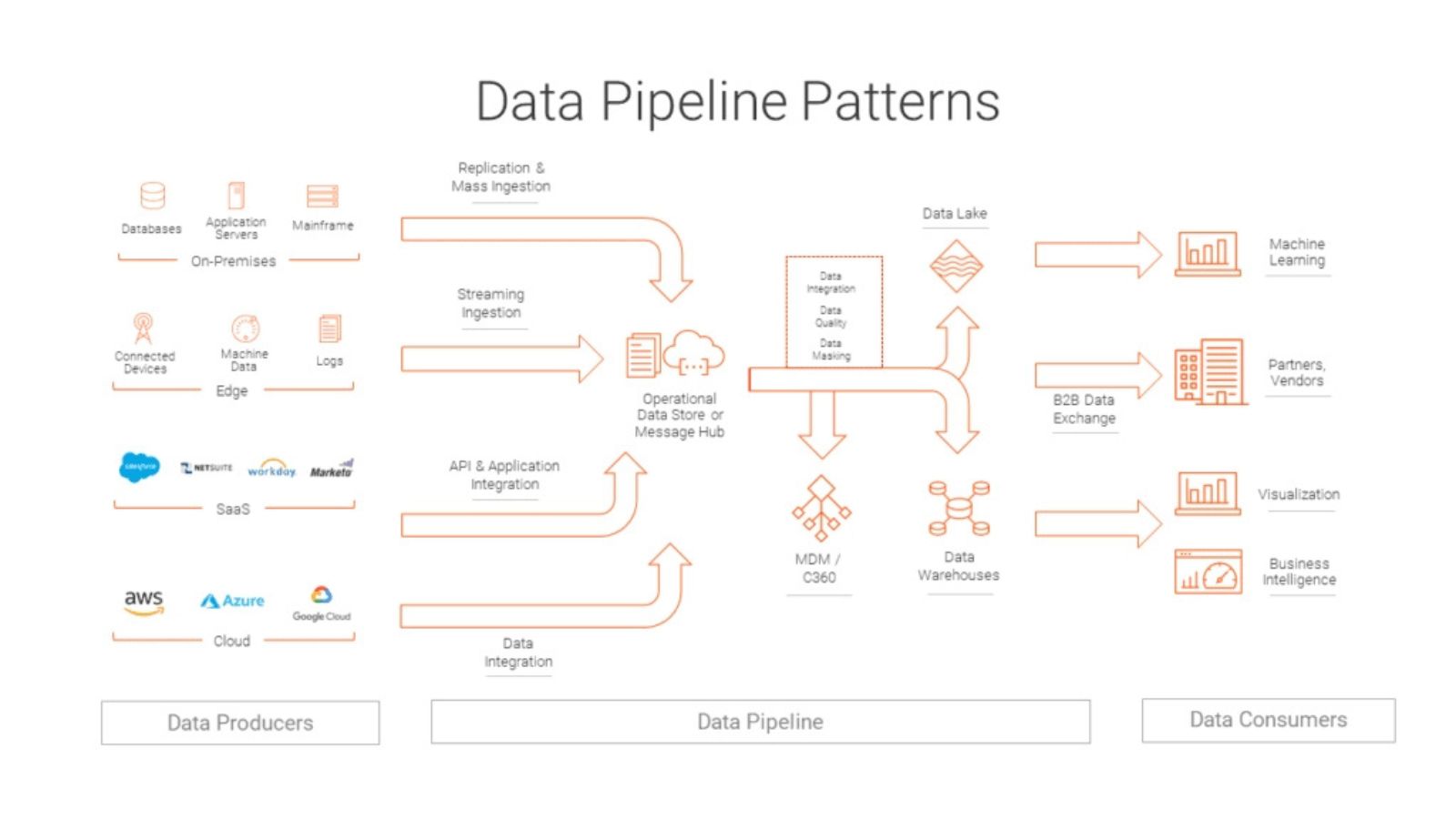
APIs introduce different challenges because external systems may impose authentication requirements, request limits, pagination, and changing response formats.
A pipeline should not assume that one API request will always return the complete dataset. Large responses are commonly divided into pages, requiring the pipeline to continue requesting data until the required records have been retrieved.
API responses may also contain nested objects, optional fields, or inconsistent values. Before delivering the data to a spreadsheet, transform these structures into a predictable tabular format.
Authentication should be handled securely. Credentials, API keys, and access tokens should not be embedded directly in spreadsheet formulas or scripts that are unnecessarily exposed to users. Where possible, use the authentication and secret-management mechanisms provided by the platform running the pipeline.
Raw data rarely arrives in exactly the form required by an analytical model.
Consider an API that returns product names with inconsistent capitalization, dates in a machine-readable timestamp, and monetary values represented as strings. A transformation layer can standardize these fields before the data reaches the spreadsheet.
Common transformations include:
· Converting data types
· Standardizing dates and categories
· Removing or handling duplicate records
· Joining related datasets
· Renaming fields
· Calculating derived values
· Handling missing or invalid values
· The transformation rules should be documented. Otherwise, a future developer or analyst may not know why a particular field was modified or how a business metric was calculated.
It is also preferable to keep business logic centralized rather than duplicating the same calculation independently across several spreadsheet models.
Spreadsheets can remain valuable even when they are not the primary data-storage system.
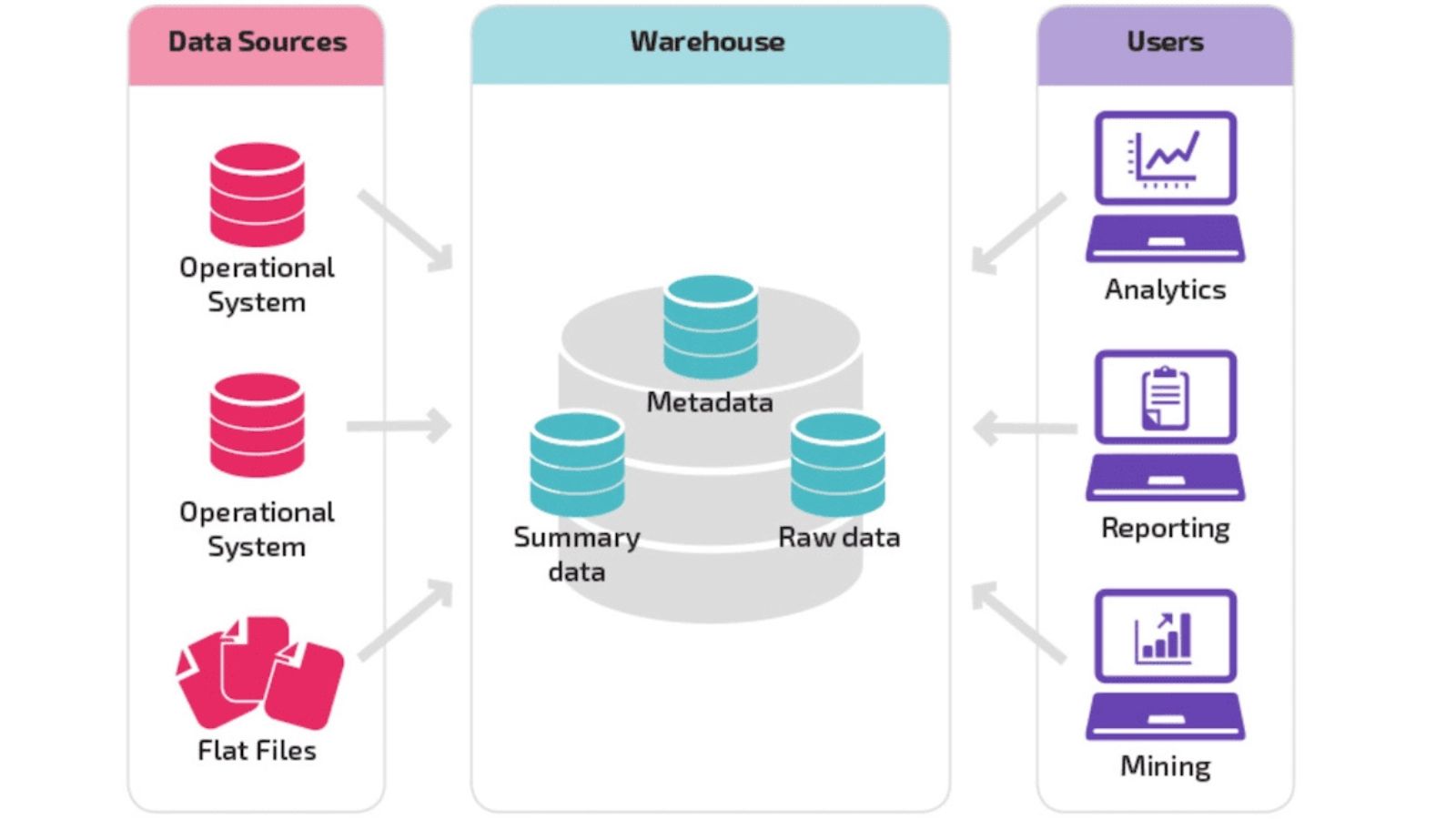
A useful architecture separates raw imported data from calculations and presentation. One part of the workbook can contain refreshed source tables, another can contain formulas or analytical calculations, and a separate area can provide charts or dashboards.
This separation reduces the chance that someone will accidentally overwrite imported records while working on an analysis.
It also makes model maintenance easier. If the pipeline consistently delivers data into a known table or range, formulas and visualizations can reference that structure without requiring users to rebuild the workbook after every refresh.
Automation increases the speed of data movement, but it does not automatically make the data correct.
Validation checks should occur before new information reaches the analytical model. Depending on the dataset, useful checks might include:
· Required fields are present.
· Record identifiers are unique where expected.
· Dates fall within reasonable ranges.
· Numeric fields contain valid values.
· Expected record counts have not changed unexpectedly.
· Reference categories match approved values.
· Validation rules should reflect the characteristics of the specific dataset. A sudden drop in daily records might indicate an extraction problem, but it could also reflect a legitimate business event.
For this reason, validation should generally flag anomalies for investigation rather than blindly deleting unusual records.
A pipeline that works perfectly under normal conditions is not enough. APIs become unavailable, credentials expire, database connections fail, and source systems occasionally return incomplete responses.
Automated processes therefore need error handling and useful logging.
A good log should help answer basic questions: When did the pipeline run? Which source was accessed? How many records were retrieved? What validation checks were performed? Did the delivery step succeed?
If a pipeline fails halfway through a process, it should also avoid creating a misleading spreadsheet state. Depending on the architecture, this may involve staging data first and publishing it only after validation succeeds.
Notifications can then alert the responsible person when a refresh fails rather than allowing users to discover the problem after opening an outdated report.
One of the most overlooked risks in automated data pipelines is a change in the structure of the source data.
An API provider might rename a field, change a data type, add a nested object, or remove a previously available attribute. A database table may also evolve as an application changes.
If the spreadsheet model expects a field called customer_id and the source suddenly provides a differently named field, the pipeline may fail—or worse, produce incomplete results without an obvious error.
Document the expected schema and test incoming data against it. For important pipelines, schema changes should trigger an alert or controlled failure rather than silently propagating bad data into financial or operational reports.
Automation becomes much easier to maintain when each refresh can be explained and reproduced.
Record information such as the extraction time, source version where applicable, number of records processed, and validation results. For incremental pipelines, maintain enough state to identify what has already been successfully processed.
This creates an audit trail and makes troubleshooting more practical. If a manager notices that a spreadsheet total changed unexpectedly, the team can investigate the corresponding pipeline run instead of trying to reconstruct the entire process manually.
Testing should cover more than whether the API connection works.
Test the pipeline with empty results, duplicate records, missing fields, malformed values, unusually large datasets, and temporary source failures. Then verify that the spreadsheet model handles the resulting data correctly.
It is particularly useful to test the final business output rather than stopping at the transformed dataset. A technically successful import is not necessarily a successful analytical refresh if a formula, pivot table, or dashboard interprets the new data incorrectly.
The best automated pipeline is not necessarily the most complicated one. It is the one that reliably moves the right data, applies transparent transformations, detects problems, and delivers a predictable analytical input.
Databases and APIs can provide authoritative source data, while spreadsheets can remain flexible environments for modeling and reporting. The key is to give each system a clearly defined role.
When extraction, transformation, validation, delivery, and monitoring are designed as connected stages, spreadsheet-based analysis becomes less dependent on manual data preparation. Instead of spending hours assembling the same report, analysts can spend more time examining the results, questioning unusual changes, and making informed decisions from a model that is refreshed through a controlled and repeatable process.